What is an OS?

OS means Operating System

University of Turin

Collegio Carlo Alberto

JPE Data Editor

2026-02-09

What is an Operating System?

Definition: Software layer between hardware and applications that manages computer resources.

Core Functions:

  • Process Management
  • Memory Management
  • File System
  • Device Drivers
  • User Interface
  • Security

OS Types - Desktop & Mobile

Desktop/Workstation

  • Windows: ~75% market share
  • macOS: ~15%
  • Linux: ~3%

Mobile & Embedded

  • Android (Linux-based): ~70% of smartphones
  • iOS: ~27% of smartphones
  • Embedded Linux

OS Types - Servers & HPC

Servers

  • Linux: ~96% of web servers
  • Windows Server
  • Unix variants (Solaris, AIX, HP-UX)

Supercomputers & HPC

  • Linux: 100% of Top500 supercomputers (even the ones owned by Microsoft.)

Scientific Computing - Workflow & Practicalities

Remote Access

  • Linux: SSH on terminal
  • macOS: SSH
  • Windows: SSH (Windows 10+), RDP, WSL2

Software Availability

  • Linux: Most scientific software developed first
  • macOS: Good support for many tools
  • Windows: WSL2 or containers

Reproducibility

  • Unix tools built-in.
  • Windows requires more effort.

Cost

  • Linux: Free
  • macOS: Locked to Apple
  • Windows: Licensing costs

Unix

How Does this Unix thing work?

  • Unix is industry standard for over 40 years.
  • Scientific Stack runs on unix.
  • Watch this video
  • Unix is based on small programs…
  • … which can be connected into a pipeline
  • Many small helpers glued together

Kernel, Shell and Application

The Shell

  • Terminal, command line, console…
  • You type commands
  • GUI vs shell

Brian Fox

Richard Stallman

The Shell 💻
(Open Your Terminals!)

Shell 101

Unix Shell 1

# where am i?
pwd 

# takes you home
cd 

# makes a new directory
mkdir my-new-dir 

# goes there
cd my-new-dir 

# creates an empty text file
touch new-file.txt

# creates an empty...pdf file?
touch new-doc.pdf
# try to open this in your pdf viewer

# lists
ls new-file.txt 
ls *  # star means anything
ls -la  # things after - are "flags", i.e. options

# echos (repeats back to your screen)
echo hi dude  # prints to screen

# echos into a File
echo hi dude > echo-file.txt  # notice: no output to screen.

# there are 2 files now!
ls .  # the dot is "this directory"

ls -la # more info

(scroll down)

Unix Shell 2: Permissions

  • A key feature of Unix is a transparent permissions system.
  • u-g-o: user - group - others
  • Each file has a mode: rwx - read, write, execute
floswald@PTL11077 ~/my-new-dir> ls -lah
total 8
drwxr-xr-x    4 floswald  staff   128B Jan 23 17:18 ./
drwxr-x---+ 277 floswald  staff   8.7K Jan 23 17:16 ../
-rw-r--r--    1 floswald  staff     8B Jan 23 17:18 echo-file.txt
-rw-r--r--    1 floswald  staff     0B Jan 23 17:16 new-file.txt

Unix Shell 3: Automation

  • The shell is great to create work pipelines
1. go there
2. run program number 1
3. take it's output and give to program number 2
4. make a table from output
5. compile a latex document to pdf
  • in other words:
# go there
cd path/to/my/project 
# run program number 1
stata-mp -b step1.do # makes step1-out.csv
# take it's output and give to program number 2
julia run-step2.jl step1-out.csv > table1.tex
# compile a latex document to pdf
latex-mk -pdf -c paper.tex

Your Text Editor ⌨️

What is a Text Editor

  • A program that allows you to edit text. 🤦‍♂️
  • Not Microsoft Word. (Why not?)
  • There are many powerful options. Choose carefully. Indeed…

Harry J. Paarsch

Choose your editor with more care than you would your spouse because you will spend more time with your editor, even after the spouse is gone.

(Quote from Jesus’ slides. Harry’s website)

  1. VScode
  2. Sublime Text
  3. Vim
  4. Emacs
  1. Notepad++
  2. TextEdit
  3. many more…your pick!

Text Editor Features

Modern alternatives share those features:

  1. Integration with open package system: extensions
  2. Web integration (same editor running online)
  3. Easy collaboration (“Live Share”)
  4. REPL integration, i.e. run code inside editor

IDE: Integrated Development Environment

  • Additionally to editing and running code, can debug, view plots and data etc…
  • VScode, JetBrains, XCode, Eclipse,…
  • RStudio, Positron, Matlab, …

Version Control

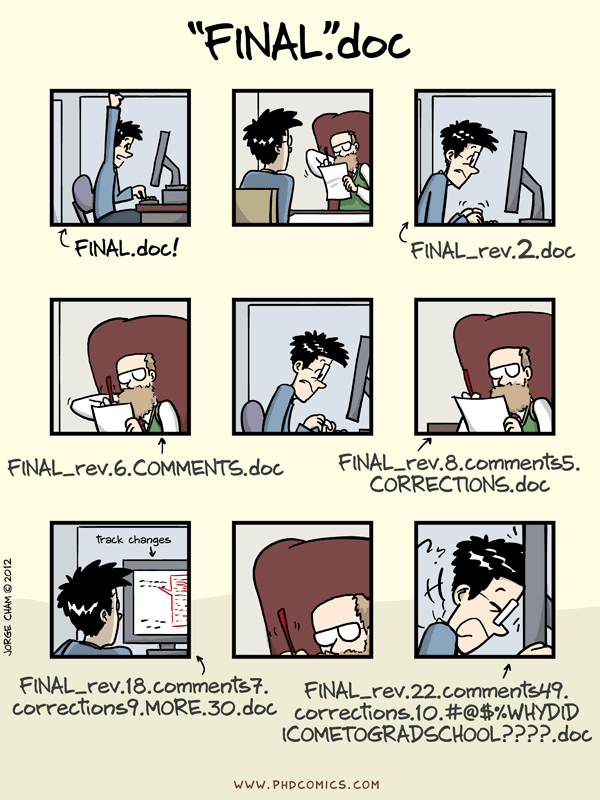
“Piled Higher and Deeper” by Jorge Cham, http://www.phdcomics.com

What’s the Problem 1?

  • Your code evolves over time. You add and substract things.
  • You often try out new things. Some you keep, some you don’t.
  • Sometimes you realize later that what you did was wrong.
  • What do you do then?

👉 Then you want to undo what you did in order to restore the previous state of your project. How could that work?

You need a system that remembers what you did when, where, and - ideally - why.

In a world with collaboration (our world), you also want to know who did all of the above.

What’s the Problem 2?

  • In a project with several collaborators, how to make sure everybody works on the correct file?
  • The correct file being not only the correct name - script.R, say - but also the correct version of the file.
  • Notice this is not always the latest version. (Maybe your collaborator was just trying out something and introduced a bug).
  • Code Syncing via Dropbox or similar is not the solution.
  • Cannot rewind history beyond 30 days
  • By default, there is only one (the latest) version.
  • It’s not clear who added what to the that version, when and why.

A Poor Man’s Solution

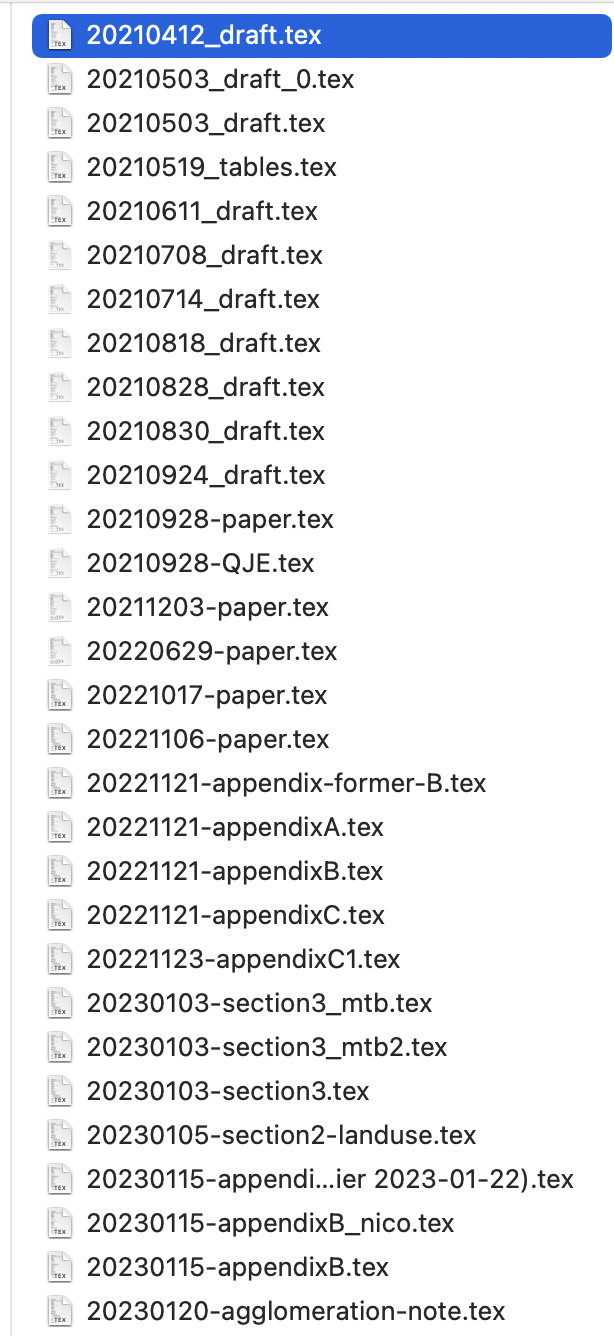
  • Many researchers swear on the YYYYMMDD system
  • You just insert the date into the filename.
  • What could possibly go wrong?
  1. People insert wrong dates
  1. You may remember last week. But 4 months ago?
  1. What is 20221121-appendixB.tex vs 20221121-appendix-former-B.tex?

A Real Solution: git

  • Professional software development without version control does not exist. 93% of developers use git, the rest uses svn or other tools.
  • If the pros use this tool, and you write code to do empirical research, then you are handicapping yourself if you don’t use it.
  • Dropbox works to simply sync files. But fails for:
    • Tracking why changes were made (commit messages)
    • Branching to try different specifications without breaking your main analysis
    • Merging contributions from co-authors working on different sections
    • Rolling back to exactly the state your code was in when you got that result 6 months ago

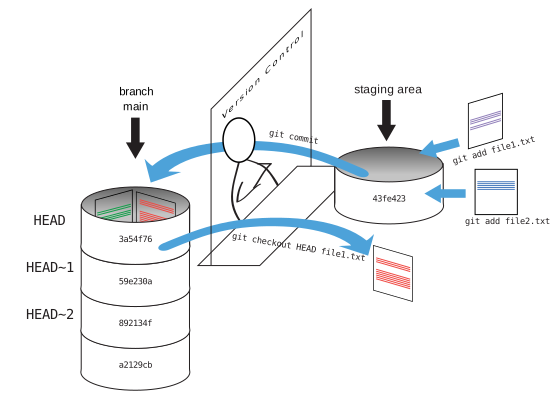
So: How does git work?!

  • Fully decentralized system. You sync with a remote server when you want.
  • You track incremental changes on your files on disk.
  • Each snapshot (commit) you take is another data point that you can go back to.
  • git works like a foto camera: you make repeated pictures of the same object(s), you label each foto with a unique id, so that you can go back to a precise version later on.
  • This is a system which requires you to take action. No automatic syncing.
  • You preserve the state of your full project at time t.

Here is git in one image

The Man: Linus Torvalds

https://en.wikipedia.org/wiki/Linus_Torvalds

Notebooks / Dynamic Reports 📝

Notebooks

  • Embedding code with output (text, images, tables) is part of literate programming
  • Write code and documentation together (Donald Knuth 1984)
  • Code needs to be readable to humans first, to machines second

Implementations

  • R: sweave, knitr, Rmarkdown
  • jupyter: language agnostic notebook
  • quarto: pandoc based “scientific publishing system”
  • Pluto.jl: pure julia reactive notebook

Donald Knuth

https://en.wikipedia.org/wiki/Donald_Knuth

What are Notebooks good for?

Situations where you want to show code and output next to each other.

  1. Teaching
  2. Sharing results with coauthors/supervisors
  3. Quick prototyping: like a script that keeps/displays output nicely

Not Good for

  • Performace critical work
  • Realistic collaboration (notebooks are difficult for version control - except Pluto.jl)

End