Spatial Data, Agent-Native

Agentic Programming

Florian Oswald

13 October, 2026

Intro

In this session we cover geospatial data and how to handle it with R — but the point is not “learn sf syntax by hand.” The point is: spatial bugs are often silent. A map with the wrong projection, a distance computed by hand on raw lon/lat coordinates instead of a projected one — these still look like a map or a plausible number. Nothing crashes. Nothing looks obviously wrong. You have to know what to check — and, just as importantly, which operations already check for you and which don’t.

tl;dr

Yes, R is a fully fledged GIS. No, you don’t need an ArcGIS (or other) license to do real work with spatial data.

Today: you’ll ask your agent (OpenCode) to propose CRS transforms and spatial joins. You verify every one against a plotted map and a known fact (an area, a distance, a row count) — because “it looks like a map” is not verification.

Resources

  1. Geocomputation with R is our main reference.
  2. The sf package vignettes are outstanding.

Why Spatial Bugs Are Different

  • Most bugs you’ve met so far (S2, S7, S8) announce themselves: wrong number, failed test, crashed script.
  • Some don’t: hand-computing a distance from raw lon/lat coordinates instead of routing through a projected CRS gives you a plausible-looking number in the wrong units, with no error and no warning.
  • A projection mistake changes areas and distances by a scale factor, but the map still looks like a recognizable outline of the country.
  • Others do announce themselves — st_join() on mismatched CRS refuses to run rather than silently mis-joining. Knowing which operations protect you and which don’t is itself part of the skill.

Warning

Rule for today: never accept an agent’s spatial code because “the plot looks right.” Always check it against something you can independently compute or already know (a real distance, a known area, an expected row count).

Spatial Data Basics

  • One prime example of spatial data are of course maps, providing an answer to the age-old question where is what.
  • Fundamentally, spatial data still provide an answer to the same question, it is just that the what part has gotten much richer over the years.
  • The attribute location may be only one of many other features of information on a certain observation.
  • Multiple measurements imply that observations can be observed moving in space.
  • There are two fundamentally different ways in which to consider spatial data:

Spatial Data Types


1. Vector Data

We represent things with points, lines and polygons. We can scale and stretch and transform those easily with mathematical operations. Can increase precision to arbitrary levels (can always zoom in further).

2. Raster Data

We have fixed-size tiles or cells (like a mosaic, or like pixels), which form a grid. Fixed resolution.

This lecture deals mostly with Vector Data (see the pointers at the end for Raster Data).

Vector Data and Coordinate Reference Systems

Representation of Vector Data

  • Basically, we concentrate on a 2-dimensional space, even though three-dimensional spaces can be useful as well (any ideas for examples?)
  • In other words, we denote a location with a tuple of coordinates \((x,y)\), or \((x,y,z)\) as the case may be, where each coordinate gives the distance from the origin in each direction. For example, we could represent Paris by the tuple c(2.34,48.85)
  • One key question in the context of spatial data concerning planet earth you should ask is: Where is the Origin?
  • Another question is, related to the well known fact that the earth is quasi-ellipsoid (i.e. a bit like a squashed football and — just to be sure: not flat), how to represent locations in three dimensions on a 2-dimensional map?

Coordinate Reference Systems (CRS)

  • CRSs use longitude and latitude to identify locations.
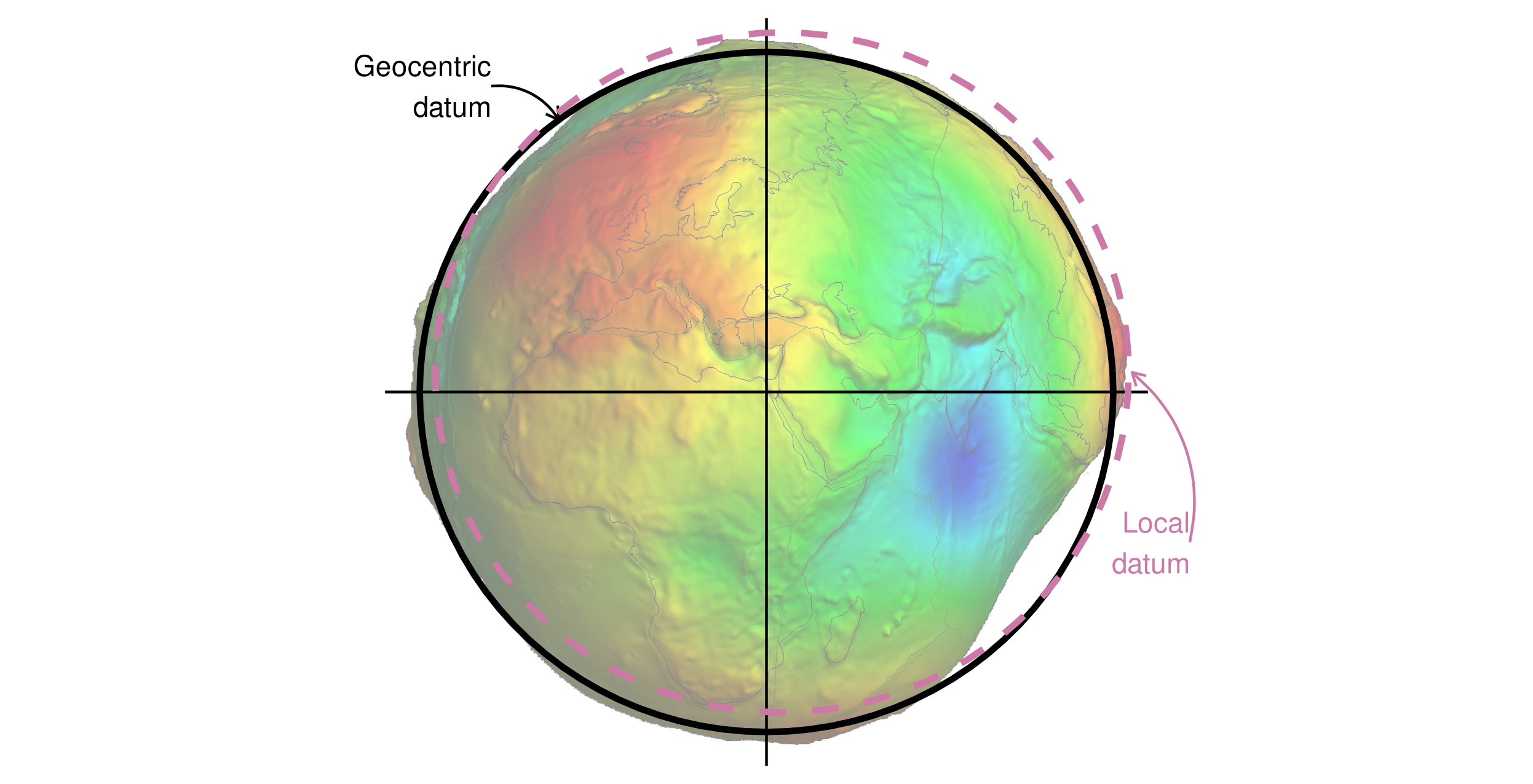
  • One widely used CRS is the World Geodetic System 1984, or WGS84 (used on google maps). It measures angular distance in degrees in a geocentric datum (made for the entire planet).
  • longitude measures East-West distance from the Prime Meridian Plane. (left-to-right distance from a starting point)
  • latitude measures North-South distance of Equatorial Plane. (up-down distance from a starting point)

Important

This is exactly the kind of thing an agent will get subtly wrong: mixing a geographic CRS (degrees) with a projected CRS (meters) in the same computation. Both “work” — neither errors out — but only one gives you a sensible distance in km.

One Standard CRS: WGS84

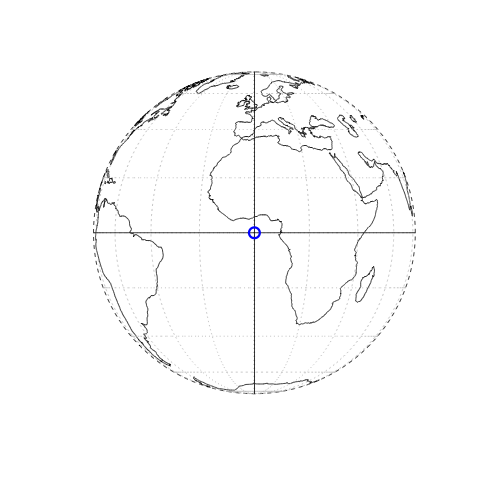
  • The dashed lines are the WGS84 ellipsoid coordinate frame
  • The blue circle is the origin at \((0,0)\):
    1. 0 degrees longitude (x-direction): Prime Meridian through Greenwich, London.
    2. 0 degrees latitude (y-direction): Equator.

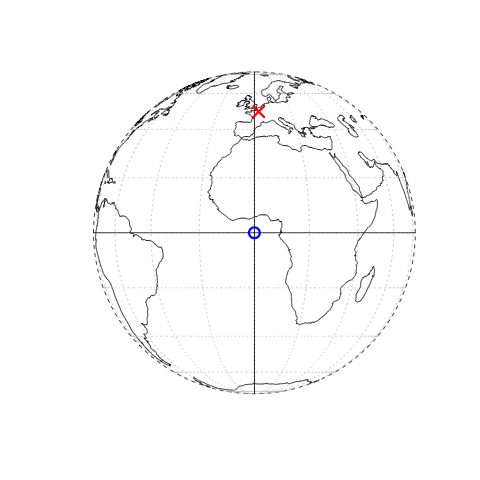
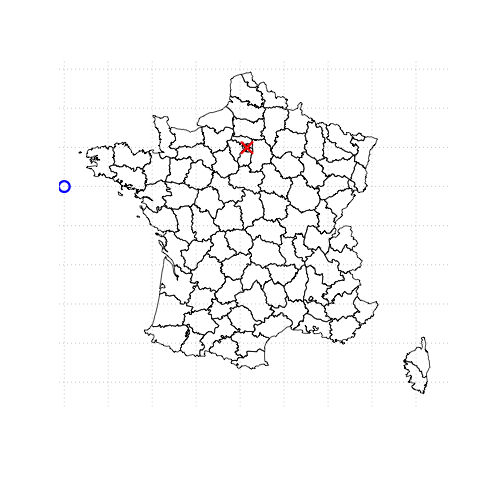
Paris in Different CRS

Paris at c(2.34,48.85) in WGS84

Paris at c(600256.4, 127726.4) in NTF Lambert North France

Same city, two totally different-looking numbers. Neither is “wrong” — but you cannot add, subtract, or compute distances across the two without transforming first.

Geocentric vs Local Datum

Figure from Geocomputation with R. Geocentric and local geodetic datums shown on top of a geoid (in false color and the vertical exaggeration by 10,000 scale factor). Image of the geoid is adapted from the work of Ince et al. (2019)

Vector Spatial Data in R, Agent-Native

The Workflow For Today

  1. You state the task in plain language (e.g. “join the Seine river network to French administrative regions and plot which regions it flows through”).
  1. The agent (OpenCode) proposes R code using sf: reads the data, checks/transforms CRS, does the join, plots it.
  1. You verify — not by eyeballing the plot alone, but by checking: same CRS on both inputs? sensible row count after the join? a known distance/area come out close to the real value?

Warning

If step 3 fails, you go back to the agent with what you found — not “it’s wrong,” but “the join produced 40 rows when there should be at most 12, I bet the CRS didn’t match before the join.”

Working with (Vector) Spatial Data in R

  • We rely on a few core libraries.
  • sf being the main one. That itself relies on several other lower level libraries.
install.packages("sf")
  • Don’t try to build from source unless you know why.
  • For problems, please consult the package readme.
  • Let’s try to load the library:
library(sf)
Warning: package 'sf' was built under R version 4.5.2
Linking to GEOS 3.13.0, GDAL 3.8.5, PROJ 9.5.1; sf_use_s2() is TRUE
  • I highly recommend the package vignettes!
vignette(package = "sf") # see which vignettes are available
vignette("sf1")          # an introduction to the package

Working with sf 1

Let’s read a shapefile from the sf package:

nc = st_read(system.file("shape/nc.shp", package="sf"))
Reading layer `nc' from data source 
  `/Users/floswald/Library/R/arm64/4.5/library/sf/shape/nc.shp' 
  using driver `ESRI Shapefile'
Simple feature collection with 100 features and 14 fields
Geometry type: MULTIPOLYGON
Dimension:     XY
Bounding box:  xmin: -84.32385 ymin: 33.88199 xmax: -75.45698 ymax: 36.58965
Geodetic CRS:  NAD27
head(nc[,c("AREA","NAME","FIPS","BIR79")])
Simple feature collection with 6 features and 4 fields
Geometry type: MULTIPOLYGON
Dimension:     XY
Bounding box:  xmin: -81.74107 ymin: 36.07282 xmax: -75.77316 ymax: 36.58965
Geodetic CRS:  NAD27
   AREA        NAME  FIPS BIR79                       geometry
1 0.114        Ashe 37009  1364 MULTIPOLYGON (((-81.47276 3...
2 0.061   Alleghany 37005   542 MULTIPOLYGON (((-81.23989 3...
3 0.143       Surry 37171  3616 MULTIPOLYGON (((-80.45634 3...
4 0.070   Currituck 37053   830 MULTIPOLYGON (((-76.00897 3...
5 0.153 Northampton 37131  1606 MULTIPOLYGON (((-77.21767 3...
6 0.097    Hertford 37091  1838 MULTIPOLYGON (((-76.74506 3...

Working with sf 2

  • Notice the geometry column.
  • This is basically a geo-referenced data.frame.
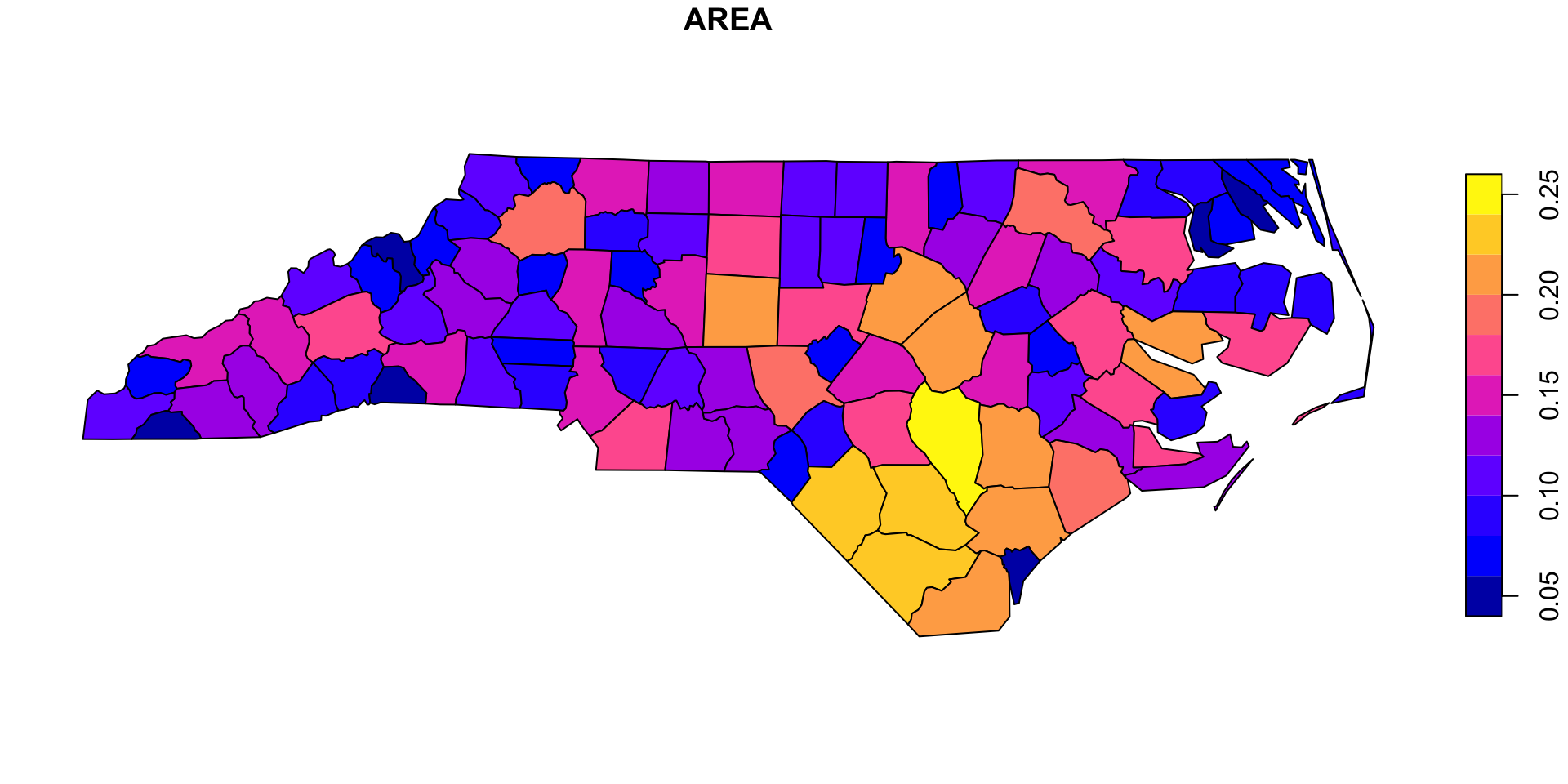
plot(nc[,"AREA"])  # plot feature "AREA" (i.e. column 1)

Working with sf 3: A Choropleth

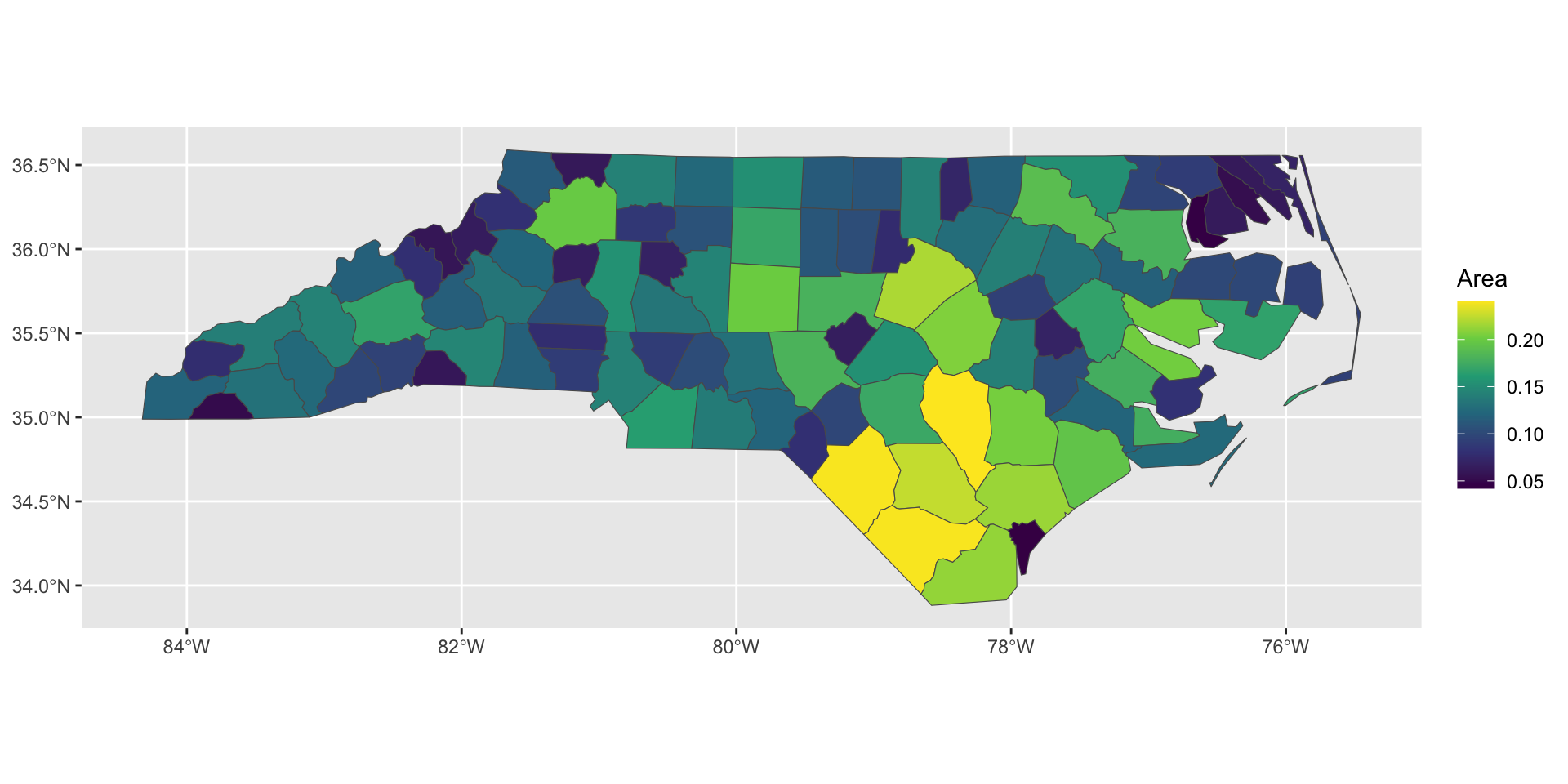
  • Works also with ggplot2 — this is our first choropleth, a map shaded by a variable value.
library(ggplot2)
ggplot(nc) + geom_sf(aes(fill = AREA)) +
    scale_fill_viridis_c(name = "Area")
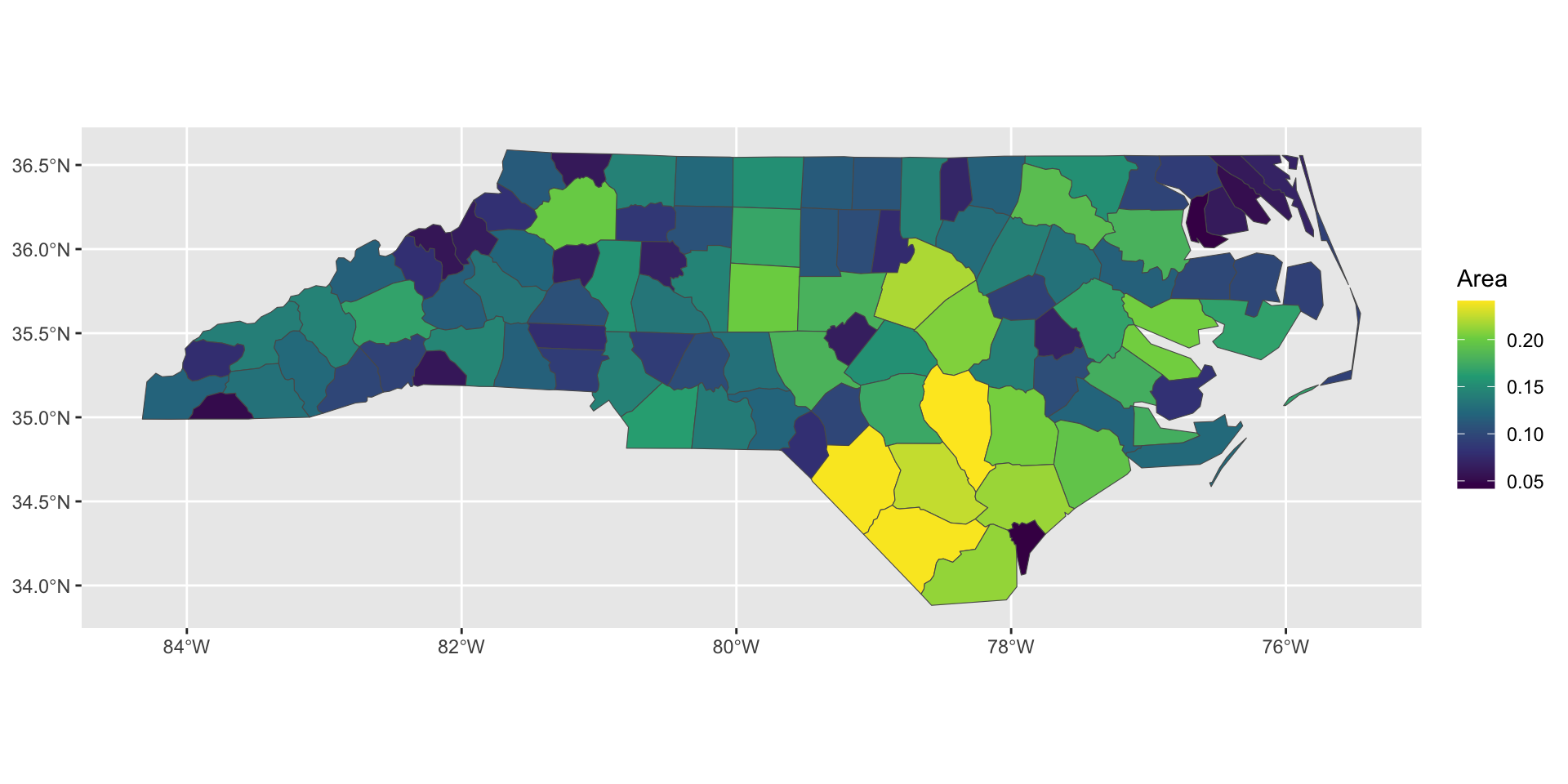
Verification check: does AREA here have sensible units? North Carolina is roughly 139,000 km². Look at range(nc$AREA) — if the numbers don’t come close to plausible, something about the units or CRS is off before you even get to the transform step.

Prompt Task 1: CRS Transform

Ask your agent:

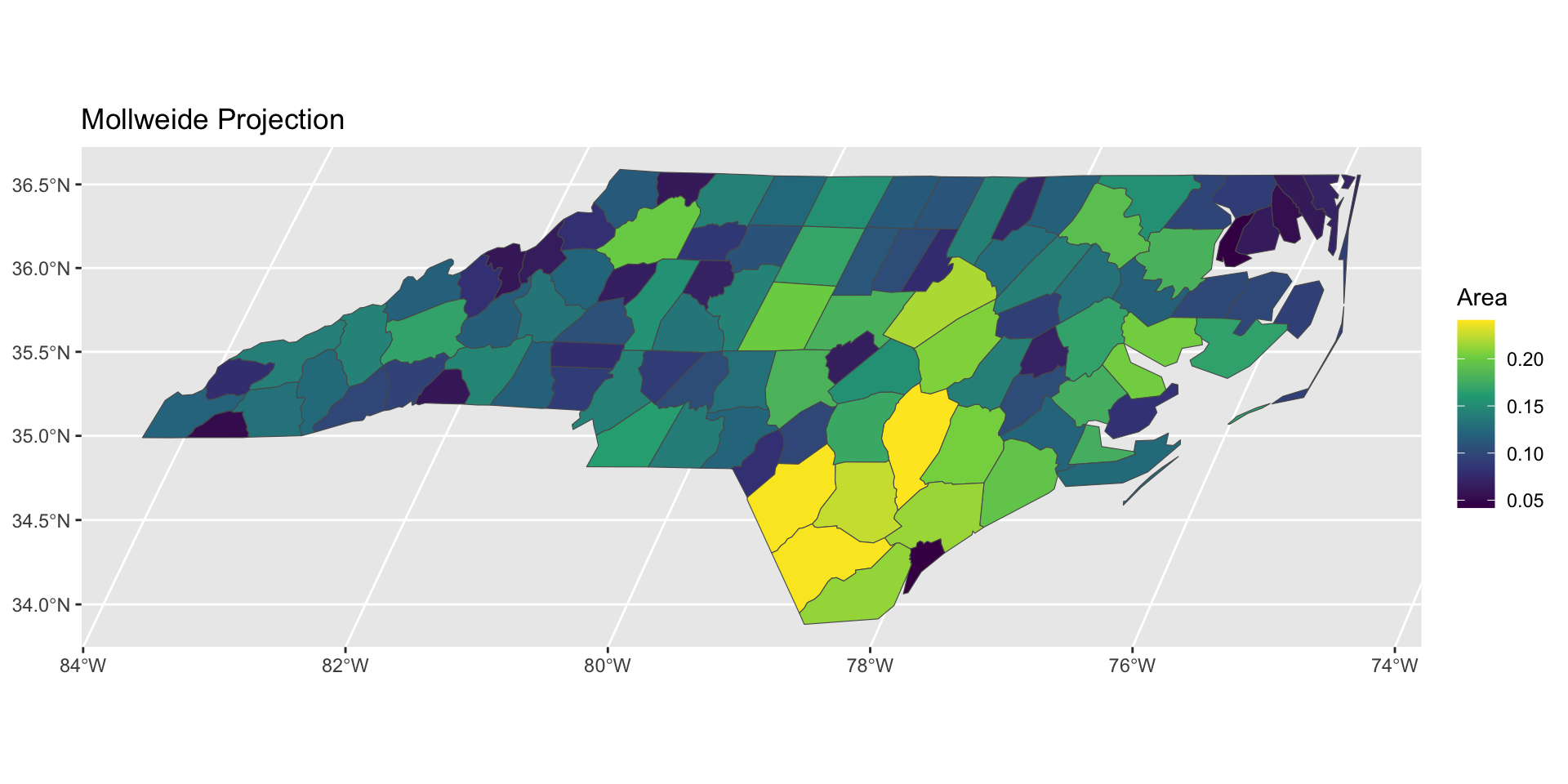
“Take the nc sf object and reproject it to the Mollweide projection (+proj=moll). Plot both the original and reprojected AREA choropleth side by side.”

Then verify:

  1. Did the agent use st_transform(), not just relabel the CRS with st_set_crs()? (The latter is the classic silent bug — it changes the label, not the coordinates.)
  2. Check st_crs(nc) before and after — did it actually change?
  3. Do the two maps look like genuinely different projections of the same shape (not just a re-scaled or shifted copy)?
library(dplyr)
ggplot(nc) + geom_sf(aes(fill = AREA)) +
    scale_fill_viridis_c(name = "Area")

nc |>
    st_transform("+proj=moll") |>
    ggplot() + geom_sf(aes(fill = AREA)) +
        scale_fill_viridis_c(name = "Area") +
        ggtitle("Mollweide Projection")
Geometric Operations with sf

  • The simple features standard specifies a series of operations.
  • The relevant functions start with st_ (for spatio-temporal): st_distance(x,y), st_intersection(x,y), st_area(x), st_union(x), st_buffer(x,dist), st_centroid(x), etc.
st_area(st_union(nc))
127025870730 [m^2]
  • That number is in m², which is not very readable. Ask the agent to convert to km² — a correct answer uses units::set_units(), not a hand-rolled /1e6 (which breaks silently if the CRS units aren’t meters to start with).
st_area(st_union(nc)) |> units::set_units(km2)
127025.9 [km^2]

Verification check: North Carolina’s land area is about 126,000 km² (roughly 139,000 km² including water). If your agent’s number is off by orders of magnitude, suspect a CRS/units mismatch, not arithmetic.

Mapping the Seine: Setting Up the Join

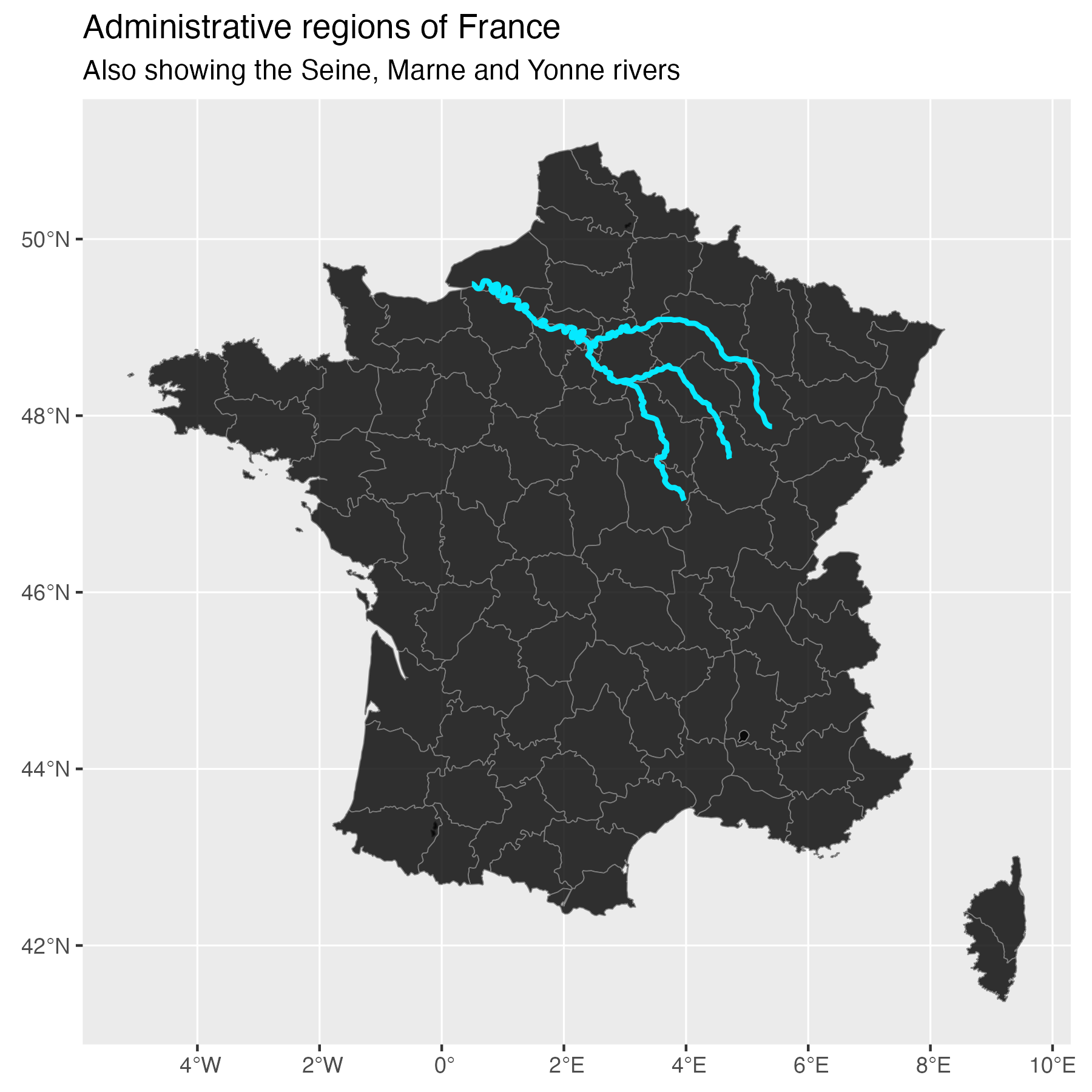
We now build a real spatial-join example: French administrative regions, joined against the Seine/Marne/Yonne river network.

sf::sf_use_s2(FALSE)
  • This specific polygon data (a maps-package outline) has a ring that the default spherical (s2) geometry engine considers invalid; switching to the older planar GEOS engine tolerates it. This is itself an “ask your agent why” moment — checklist item 5 below.
# install.packages(c("maps","spData"))
france = st_as_sf(maps::map('france', plot = FALSE, fill = TRUE))
data("seine", package = "spData")

Important

This is exactly the moment to prompt-check your agent. Ask it: “before you join france and seine, print st_crs(france) and st_crs(seine) — are they the same?” If the agent skips this and jumps straight to st_join(), push back — that’s the step worth double-checking.

Mapping the Seine: The Fix

## Make sure they have the same projection
seine = st_transform(seine, crs = st_crs(france))

pseine = ggplot() +
  geom_sf(data = france, alpha = 0.8, fill = "black", col = "gray50") +
  geom_sf(data = seine, col = "#05E9FF", lwd = 1) +
  labs(title = "Administrative regions of France",
       subtitle = "Also showing the Seine, Marne and Yonne rivers")

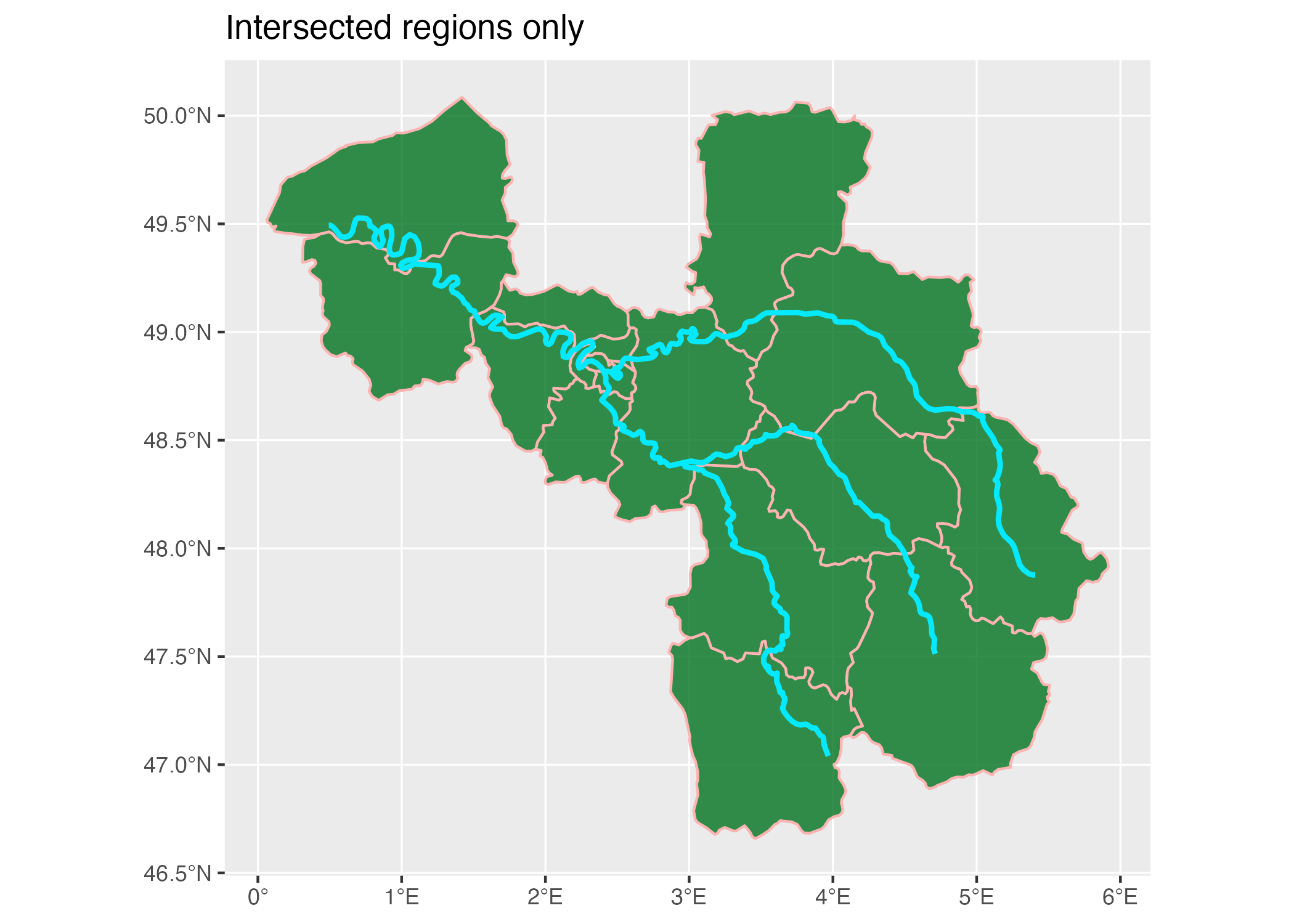
Spatial Join: Which Regions Does the Seine Flow Through?

pl4 = st_join(france, seine) |>
  ## Get rid of regions with no overlap
  dplyr::filter(!is.na(name)) |>
  ## Some regions are duplicated b/c two
  ## branches of the river network flow through them
  dplyr::distinct(ID, .keep_all = TRUE) |>
  ggplot() +
  geom_sf(alpha = 0.5, fill = "#01731f", col = "#fcb4b3", linewidth = 0.5) +
  geom_sf(data = seine, col = "#05E9FF", lwd = 1) +
  labs(title = "Intersected regions only") +
  theme_bw()

The Seeded Bug: Not Every Operation Protects You

Here is a version of this exact join, as an agent might first hand it back to you — with the CRS-fix step dropped:

## Reload a fresh, untransformed copy — this demo shouldn't depend on
## whether you ran the (eval:false) fix chunk above in your own session.
data("seine", package = "spData")

## BUG: no st_transform() before the join — seine is still in its
## original CRS, france is in whatever maps::map() returns.
pl_bug = st_join(france, seine) |>
  dplyr::filter(!is.na(name))
Error in `st_geos_binop()`:
! st_crs(x) == st_crs(y) is not TRUE

Good news, this time: st_join() checks that both inputs share a CRS and refuses to run rather than silently matching on whatever coordinates it has — you get st_crs(x) == st_crs(y) is not TRUE immediately, not a plausible-looking-but-wrong map. That’s sf protecting you. Not every spatial computation is this well-behaved — the next section shows one that isn’t.

A Genuinely Silent Bug: Distance Without Projecting

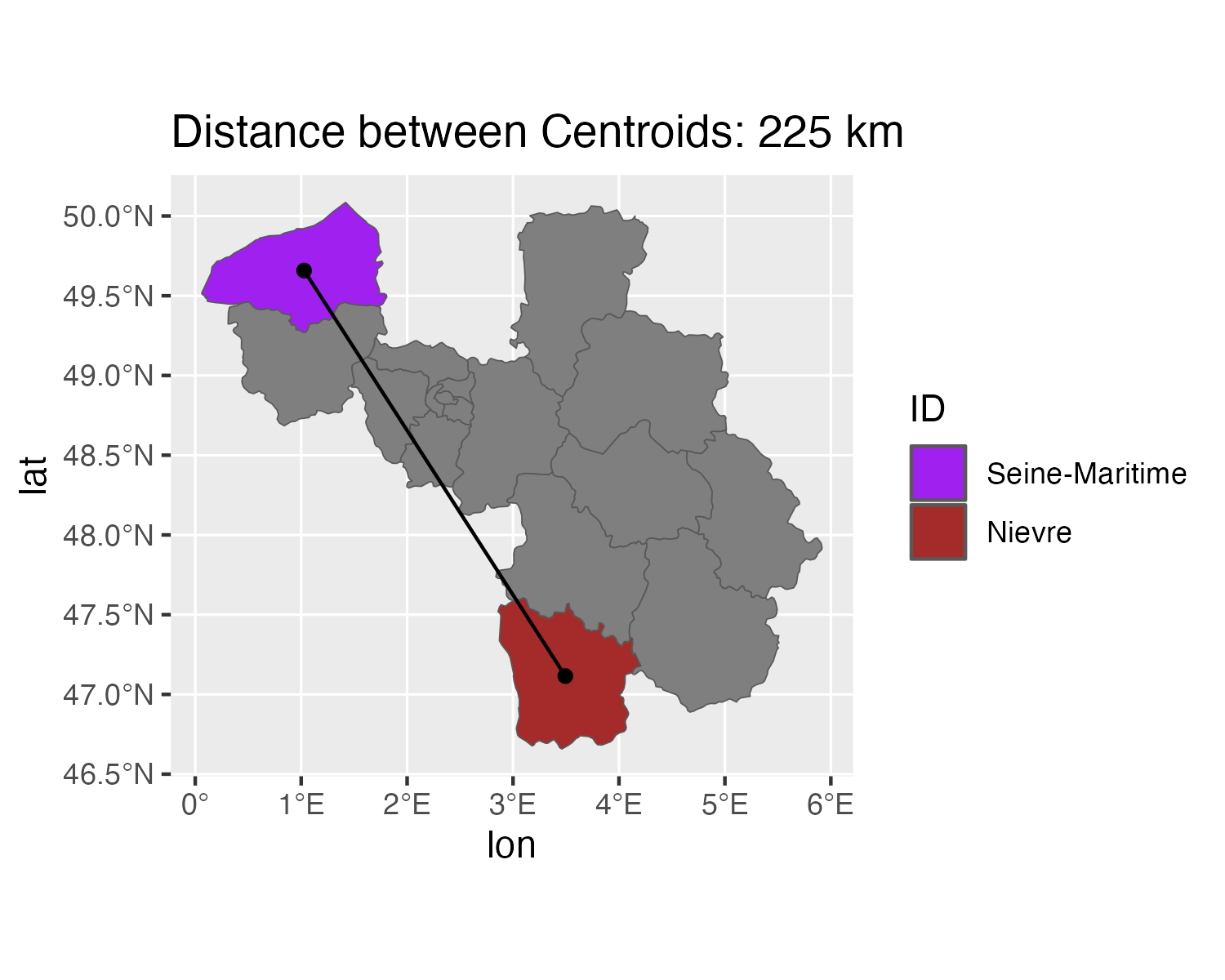
  • A typical question: what’s the straight-line distance between the centroids of the Seine-Maritime and Nièvre départements?
  • st_distance() itself is CRS-aware — it does the sensible thing even on unprojected lon/lat input. But nothing stops an agent (or you) from reaching past it: pulling raw coordinates with st_coordinates() and hand-computing a Euclidean distance directly. That version has no error, no warning, and just returns a number — in degrees, silently mistaken for kilometers.
pl = st_join(france, st_transform(seine, crs = st_crs(france))) |>
  dplyr::filter(!is.na(name)) |>
  dplyr::distinct(ID, .keep_all = TRUE)

subdeps = pl |> dplyr::filter(ID %in% c("Seine-Maritime", "Nievre"))
cents = st_centroid(subdeps)

## BUG: hand-rolled Euclidean distance on raw lon/lat coordinates,
## silently treated as if it were kilometers.
xy = st_coordinates(cents)
naive_dist = sqrt(sum(diff(xy)^2))

## Correct: project to a metric CRS first, then use st_distance().
correct_dist = subdeps |>
  st_transform(2154) |>
  st_centroid() |>
  st_distance() |>
  units::set_units("km")

naive_dist
[1] 3.542147
correct_dist
Units: [km]
         [,1]     [,2]
[1,]   0.0000 336.5977
[2,] 336.5977   0.0000

Verification check: the real straight-line distance between these two départements’ centroids is roughly 335–340 km — two independent routes (a projected planar distance and a great-circle distance on the unprojected coordinates) agree within a couple of km of each other. naive_dist above comes out around 3.5 — two orders of magnitude off, because it’s a difference measured in degrees, not km. Nothing in that computation errors or warns; you only catch it by checking against an outside number.

Task: Catch the Silent One

  1. Ask your agent for the straight-line distance between two départements’ centroids, without mentioning the projection pitfall.
  2. Check whether it routed the computation through a projected CRS and st_distance(), or hand-computed coordinates directly. Either can look like a normal, plausible number — that’s the point of a silent bug.
  3. Verify the result both ways: (a) plot the two centroids and a connecting line — does it look right on the map? — and (b) check the number against an outside source (a map-ruler estimate, a second computation route).
  4. Write down, in your own words: what did the wrong version’s number look like, and what specific check caught it? This is the “one case you had to correct” for this session’s outcome.

Task: Distances, Verified

Modifying the join from before, ask your agent to produce two plots:
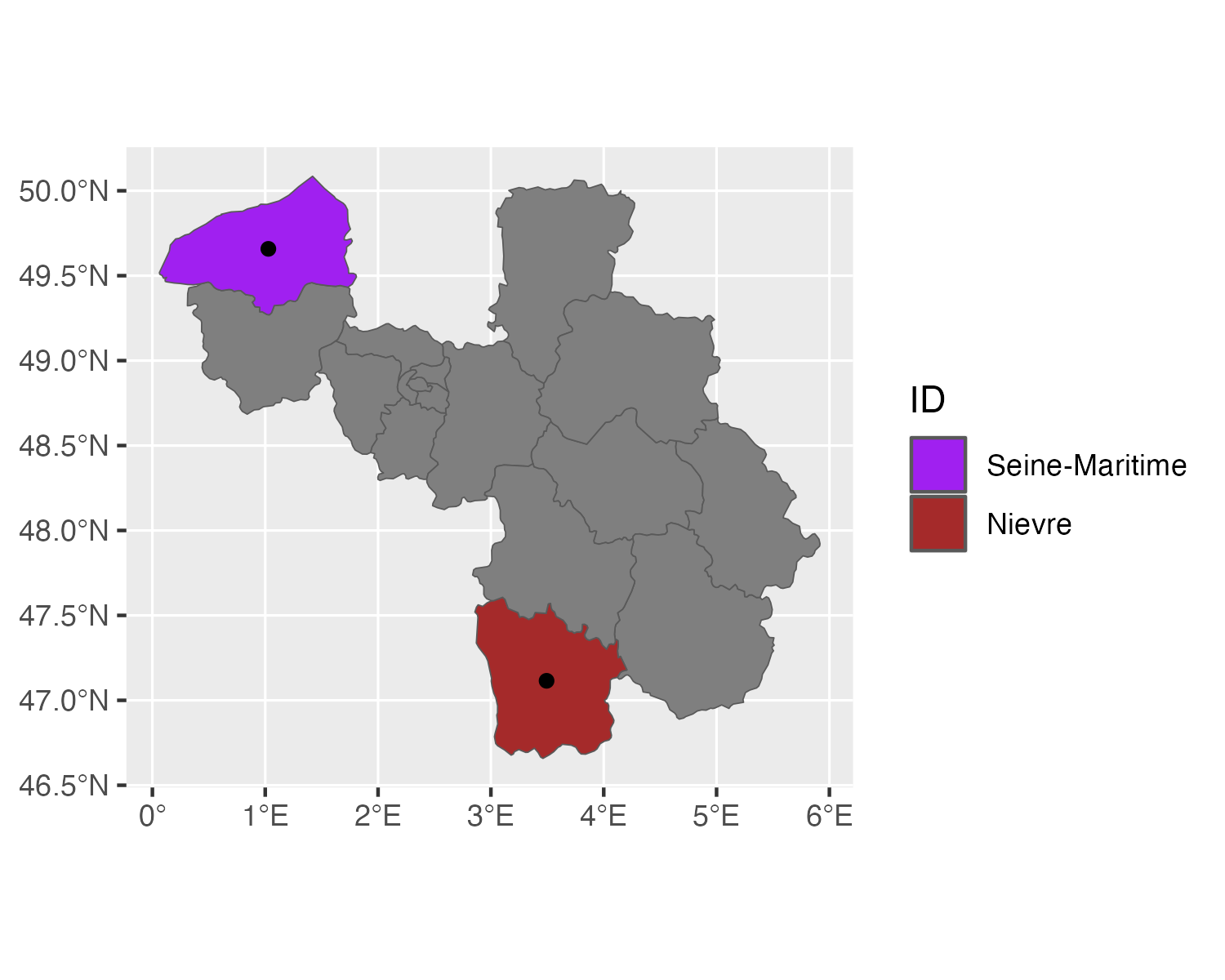
  1. One that colors only the two named départements and marks their centroids.
  2. Another with a straight line connecting both centroids, printing the distance in km in the plot title.

Figure 1

Figure 2

Desired outputs

Then verify the printed distance against an independent source (e.g. a quick search for the two départements’ préfectures and a rough map-ruler estimate) before you trust it.
Choropleth + Join, Put Together

This session’s outcome is a correct choropleth or spatial join you can explain end-to-end, including the one case you had to correct. A minimal checklist to walk through with your own agent-produced map:

  1. CRS check: did you print st_crs() on every input before combining them?
  1. Transform, don’t relabel: st_transform() changes coordinates; st_set_crs() only changes the label. An agent using the latter to “fix” a mismatch is a bug, not a fix.
  1. Row-count sanity: after a join, does the row count match what you’d expect (not exploded by duplicate matches, not collapsed to zero)?
  1. Independent number: does at least one summary statistic (area, distance, count) match something you can verify outside the code — a real-world fact, a back-of-envelope estimate, or a value from a different tool?
  1. Can you explain it? If your agent used a function you don’t recognize (e.g. sf_use_s2()), ask it to explain why it was necessary before moving on.

Raster Data (Pointer Only)

What’s Different?

  • We have a grid (pixels) where each cell contains one single data value — usually our measure of interest.
  • We can have multiple layers of measurements (e.g. temperature, humidity and elevation for a grid cell).
  • CRS considerations equally apply — and so does the same discipline: verify before you trust.
  • Remote Sensing Data (e.g. Satellite images) are often in raster format.

Raster and Further Spatial Resources

End